General idea Applications:
-android / -web-app
/ -in computer Guidelines for installing Csound
Unlike piano,
guitar and all the other instruments tuned to fixed equal temperament
singers, string and wind players can tune their chords clean according
to just intonation that derives from the frequency ratios of the
natural overtone series.
http://www.kylegann.com/tuning.html
To help to
practice just intonation I have written a tool where you can choose,
from which note a chord will be built, you can choose, which notes of
the chord will be played and if you play your own note into
microphone, the application will show you the frequency ratio to the
base note of the chord so you can check, how clean is your intonation.
Often the preciseness of intonation is shown as derivation in cents from equal temperament (cent - 1/100 of a tempered semitone, for example a "clean" major third is -14 cents), but here I have used frequency ratios since this is actually that counts for the resonance of two notes sounding together. The most important ratios are:
octave - 2:1
(2.0)
perfect fifth - 3:2 (1.5)
major third - 5:4 (1.25)
minor third - 6:5 (1.20)
minor (natural) seventh - 7:4 (1.75)
Compared to
equal temperament, the "clean" seventh is much lower, major third
lower, minor third higher.
Good tuning!
Tarmo
Johannes tarmo <at> otsakool .
edu . ee
The sound
part in the applications is programmed using Csound.
You need
android at least version 2.3 (API 10)
Download and install: http://tarmo.uuu.ee/android/IntonationHelper.apk
(NB! Allow installing software from third party sources, the app is not
aivaliable in Google Play yet).
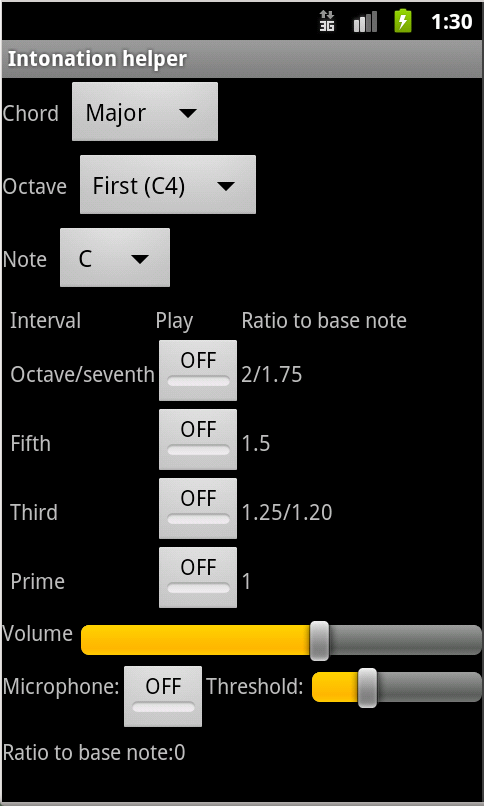
Choose note, octave, chord. You can turn on or off every step of the chord separately.
If you turn
on "Microphone" play one note of the chord and the app reports,
what is its ratio to the base note, i.e. how well you have intonated
the note. You can see the expected values form the table next to ON/OFF
buttons.
If you have
rather old and slowe android device, the sound may crackle when using
microphone input - there is just not enough power for all the
computations.
Choose enough
high input theshold value, otherwise surrounding noise or other notes
of the chord may spoil correct feedback.
Play close
enough to the microphone! If possible, use external speakers!
... is up on http://tarmo.uuu.ee/varia/failid/cs/nacl/Intonation_helper.html
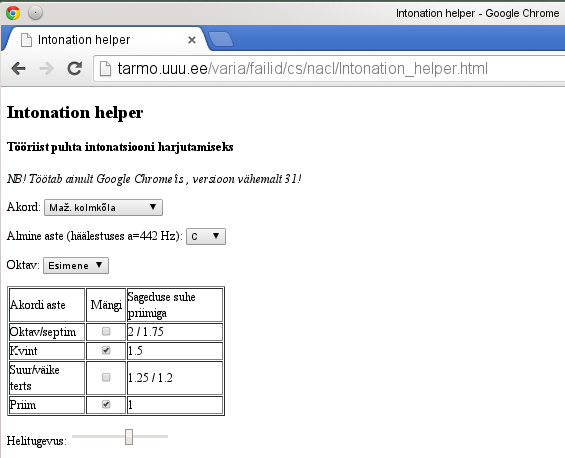
It works only in browser Google Chrome version at least 31, since the app uses Google Native Client technology that downloads Csound module so the user does not need to install anything extra.
The web app works only in laptops or desktops, not in android or iOs devices (iPads, iPhones).
Also you cannot use the microphone input with the web app but the clean chords are there and practicing intonation according to them is completely possible!
You can use
the application with microphone input in a computer if you
install free software Csound and its
frontend CsoundQt (that is usually included int the Csound installation
package).
1) Install
Csound and CsoundQt (see here for guidelines),
2) Save Csound file http://tarmo.uuu.ee/android/intonation-helper.csd
to your computer
3) Open it in
CsoundQt and run (press button Run)
4) In the panel "Widgets" you will find buttons and sliders that let
you pick the note, play steps of the chord, adjust volume etc.
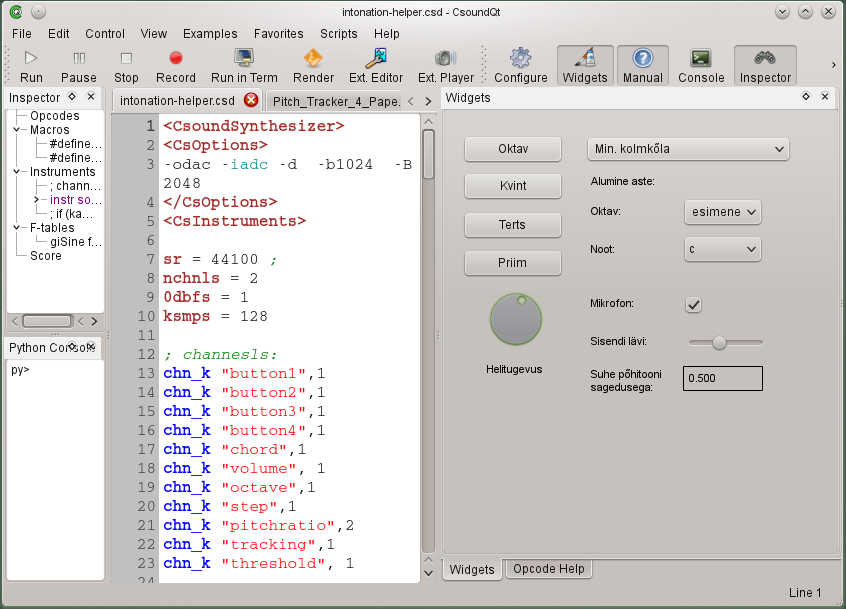
If the
computer is connected with a microphone you can use also the frequency
ratio feedback of your played note.
Csound is a powerful free software for sound synthesis.
Go to page http://sourceforge.net/projects/csound/files/csound6/
and pick the latest version (currently 6.02)
CsoundQt
gets installed by default. You can uncheck "Pure data csound
object" and "Python features" during installation.
10.7 or
newer: http://sourceforge.net/projects/csound/files/csound6/Csound6.02/Csound6.02.0-OSX10.9-x86_64.dmg/download
10.6: http://sourceforge.net/projects/csound/files/csound6/Csound6.02/Csound6.02-OSX10.6.dmg/download
Front end
CsoundQt is included in the package. Just drag it to Applications and
run it.
You can Csound Debian package on http://sourceforge.net/projects/csound/files/csound6/Csound6.02/
If that does
not help you, it is not hard to build Csound yourself. Download
source code: http://sourceforge.net/projects/csound/files/latest/download?source=files
See guidelines
http://sourceforge.net/p/csound/wiki/Building%20and%20Installing%20Csound%206%20on%20Fedora%2018/
or http://sourceforge.net/p/csound/wiki/Build_Debian_Ubuntu/
CsoundQt
source code: http://sourceforge.net/projects/qutecsound/files/CsoundQt/0.8.2/csoundqt-0.8.2-src.tar.gz/download
How to
build:
http://sourceforge.net/p/csound/wiki/Building%20CsoundQt%20for%20Csound6%20on%20Debian-Ubuntu/